Meta advises keeping the top 14% and the bottom 35% of a Story or Reel free, plus about 6% on each side, so the app interface does not cover your message. Keep every word, logo and face you need people to see inside the remaining area, which at 1080 x 1920 px is roughly 950 px wide and 979 px tall.
Those are the numbers in Meta's Stories carousel specs, its Stories video specs and its Reels image specs. All three pages give the same margins. Note that these are ad specs: Meta publishes the margins for ads, and applying them to organic Stories and Reels is our inference, because the same profile icon and buttons appear there. The rest of this post turns them into pixels you can use.
What are the Story and Reel safe zones in pixels?
Meta states the margins as percentages of the full frame: about 14% top, 35% bottom and 6% on each side. We converted them for the standard 1080 x 1920 canvas, and for the 1440 x 2560 size Meta lists for Stories video and Reels images.
| Edge | Share of frame | At 1080 x 1920 | At 1440 x 2560 |
|---|---|---|---|
| Top | 14% | 269 px | 358 px |
| Bottom | 35% | 672 px | 896 px |
| Left | 6% | 65 px | 86 px |
| Right | 6% | 65 px | 86 px |
| Usable width | 88% | 950 px | 1,268 px |
| Usable height | 51% | 979 px | 1,306 px |
Round the values up if you want a clean number to type into a template: 270 px top, 675 px bottom, 65 px sides. Only about half the frame is really yours, which is why a full-bleed layout with a headline pinned near the bottom fails so often.
What does the interface actually cover?
Meta says the margins protect your creative from being cropped or hidden by the profile icon and the call-to-action button. Those are the only two elements its pages name. In our observation the app also shows caption and reply controls near the bottom, and they can change between app versions, so keep a buffer rather than designing to the exact pixel.
The 6% side margin is small. Our assumption is that it guards against edge cropping on phones with different screen ratios; Meta does not say.
Is the Reels safe zone different from the Stories one?
In Meta's current ads guide, no: the Stories and Reels pages list the same 14%, 35% and 6%. If you build to the larger numbers, your design is safe in both placements and you never need two versions.
What size should the canvas be?
Use 9:16. Meta's Stories carousel page gives 1080 x 1920 px as a minimum, while the Stories video page and the Reels image page list 1440 x 2560 px as the resolution. Both are the same shape, so the margins stay proportional. The Reels image page also names JPG or PNG with a 30 MB cap. For feed sizes, see our Instagram post sizes guide, and for all platforms the social media image size cheat sheet.
What does a safe layout look like?
Our engine cannot draw an interface overlay on top of a template, so here is a 1080 x 1920 render to measure against the table. The tag and headline sit between about 355 px and 810 px from the top, well inside the safe band (269 px to 1,248 px). The small line near 1,485 px is a deliberate mistake: it falls in the bottom 35%, where the caption and buttons would cover it.
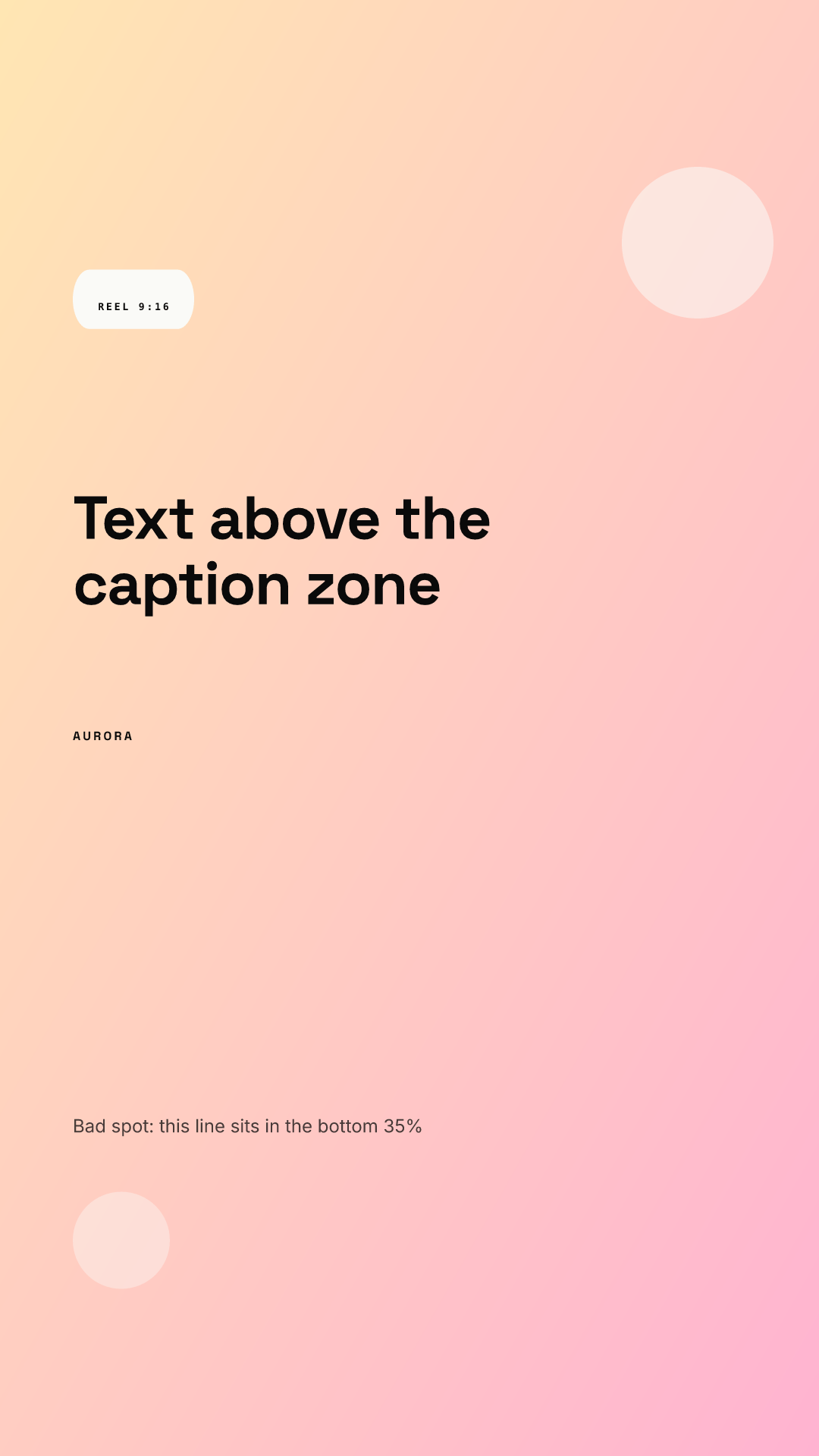
Two habits make this repeatable. Put the headline in the upper-middle band, and keep the logo or call to action above the 672 px bottom margin. In Chikaboom the template owner sets those slot positions once, text shrinks inside its box instead of spilling into the interface zone, and the whole team inherits it. You can try that in the live demo.
Why is the bottom margin so much bigger than the top?
Meta does not explain the difference. Our reading is that the bottom likely carries more interface than the top, so a headline pinned low in the frame, as many feed designs do, is the first thing to be covered. Moving it up costs nothing.
Safe zone checklist before you publish
- Canvas is 1080 x 1920 px (or 1440 x 2560), 9:16.
- No text or logo in the top 269 px or the bottom 672 px.
- Nothing important within 65 px of the left or right edge.
- Headline is short enough to read in two seconds; background imagery may run full bleed.
- Preview the post on a phone before it goes live, since it is the only true test of overlap.
- Reusing a vertical video as a cover? Check the crop against the grid in the TikTok cover image size guide, which has its own margins.